Informs that the element is available for editing by the user – you can delete text and enter a new one. Standard commands like undo, paste text from the buffer, etc. also work. Compatible with all browsers. Attribute contenteditable has a fixed set of values, it can be an empty string, true or false. Empty string or true indicate that the element is editable.
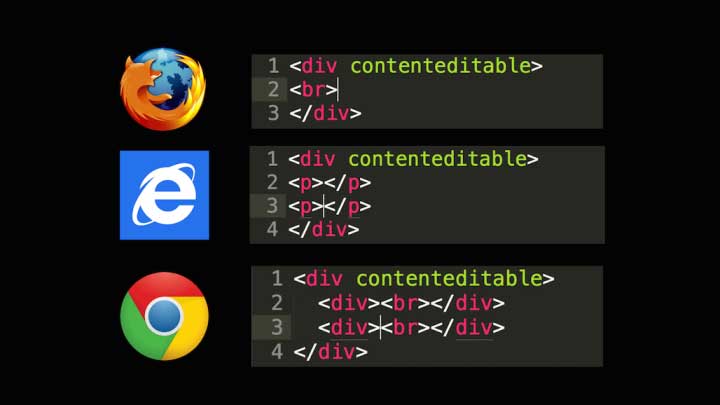
Meaning false indicates that the element is not editable. There is also a third state — inherit, this is the attribute’s default value and means that the value is inherited from the parent element. All descendants of this element also become editable if the attribute contenteditable they obviously don’t have it installed in false.
contenteditable=”true | false”
true Enables editing mode.
false Prevents editing an element.
inherit An element is editable if its immediate parent is editable.
Instead of true it is acceptable to specify an empty value (contenteditable=””) or not write it at all (contenteditable).
See also... New method for observing individual atoms confirms century-old quantum mechanical theory |
Applies to tags:
<a>, <abbr>, <address>, <area>, <b>, <basefont>,
<bdo>, <blockquote>, <body>, <button>, <caption>, <cite>,
<code>, <col>, <colgroup>, <dd>, <del>, <dfn>, <dir>,
<div>, <dl>, <dt>, <em>, <fieldset>, <form>, <h1>, <h2>,
<h3>, <h4>, <h5>, <h6>, <i>, <iframe>, <input>, <ins>,
<kbd>, <label>, <legend>, <li>, <menu>, <ol>, <option>,
<p>, <pre>, <q>, <samp>, <select>, <span>, <strong>,
<sub>, <sup>, <table>, <tbody>, <td>, <textarea>,
<tfoot>, <th>, <thead>, <tr>, <ul>, <var>

Example
HTML
<p id="myText" contenteditable >Edit the contents of this field. Click Save to
save changes. Click Reset to return to original text.</p>
<button class="btn btn-primary" onclick="saveChanges()">Save</button>
<button class="btn btn-warning" onclick="clearStorage()">Reset</button>
JavaScript
var text = document.getElementById('myText');
var myData;
var postData = window.localStorage.getItem("save");
var reset = text.innerHTML;
// if no data
if (postData == null || postData == '') {
    myData = text.innerHTML;
    // store default value
    window.localStorage.setItem("save", myData);
    // make it placeholder style
    text.classList.remove('changed');
} else {
    // if there is a value post it
    text.innerHTML = postData;
    // make dark text
    text.classList.add('changed');
}

function saveChanges() {
    // store the current value
    myData = text.innerHTML;
    // local store the value
    window.localStorage.setItem("save", myData);
    text.classList.add('changed');
}

function clearStorage() {
    text.classList.remove('changed');
    // clear storage
    window.localStorage.clear("save");
    // return to default text
    text.innerHTML = reset;
}
CSS
p {
    margin: 1em;
    color: #777;
}

p.changed {
    color: black;
}

button {
    margin: 0 1em;
}

.btn {
  display: inline-block;
  *display: inline;
  padding: 4px 10px 4px;
  margin-bottom: 0;
  *margin-left: .3em;
  font-size: 13px;
  line-height: 18px;
  *line-height: 20px;
  color: #333333;
  text-align: center;
  text-shadow: 0 1px 1px rgba(255, 255, 255, 0.75);
  vertical-align: middle;
  cursor: pointer;
  background-color: #f5f5f5;
  *background-color: #e6e6e6;
  background-image: -ms-linear-gradient(top, #ffffff, #e6e6e6);
  background-image: -webkit-gradient(linear, 0 0, 0 100%, from(#ffffff), to(#e6e6e6));
  background-image: -webkit-linear-gradient(top, #ffffff, #e6e6e6);
  background-image: -o-linear-gradient(top, #ffffff, #e6e6e6);
  background-image: linear-gradient(top, #ffffff, #e6e6e6);
  background-image: -moz-linear-gradient(top, #ffffff, #e6e6e6);
  background-repeat: repeat-x;
  border: 1px solid #cccccc;
  *border: 0;
  border-color: rgba(0, 0, 0, 0.1) rgba(0, 0, 0, 0.1) rgba(0, 0, 0, 0.25);
  border-color: #e6e6e6 #e6e6e6 #bfbfbf;
  border-bottom-color: #b3b3b3;
  -webkit-border-radius: 4px;
     -moz-border-radius: 4px;
          border-radius: 4px;
  filter: progid:dximagetransform.microsoft.gradient(startColorstr='#ffffff', endColorstr='#e6e6e6', GradientType=0);
  filter: progid:dximagetransform.microsoft.gradient(enabled=false);
  *zoom: 1;
  -webkit-box-shadow: inset 0 1px 0 rgba(255, 255, 255, 0.2), 0 1px 2px rgba(0, 0, 0, 0.05);
     -moz-box-shadow: inset 0 1px 0 rgba(255, 255, 255, 0.2), 0 1px 2px rgba(0, 0, 0, 0.05);
          box-shadow: inset 0 1px 0 rgba(255, 255, 255, 0.2), 0 1px 2px rgba(0, 0, 0, 0.05);
}

.btn:hover,
.btn:active,
.btn.active,
.btn.disabled,
.btn[disabled] {
  background-color: #e6e6e6;
  *background-color: #d9d9d9;
}

.btn:active,
.btn.active {
  background-color: #cccccc \9;
}

.btn:first-child {
  *margin-left: 0;
}

.btn:hover {
  color: #333333;
  text-decoration: none;
  background-color: #e6e6e6;
  *background-color: #d9d9d9;
  /* Buttons in IE7 don't get borders, so darken on hover */

  background-position: 0 -15px;
  -webkit-transition: background-position 0.1s linear;
     -moz-transition: background-position 0.1s linear;
      -ms-transition: background-position 0.1s linear;
       -o-transition: background-position 0.1s linear;
          transition: background-position 0.1s linear;
}

.btn:focus {
  outline: thin dotted #333;
  outline: 5px auto -webkit-focus-ring-color;
  outline-offset: -2px;
}

.btn.active,
.btn:active {
  background-color: #e6e6e6;
  background-color: #d9d9d9 \9;
  background-image: none;
  outline: 0;
  -webkit-box-shadow: inset 0 2px 4px rgba(0, 0, 0, 0.15), 0 1px 2px rgba(0, 0, 0, 0.05);
     -moz-box-shadow: inset 0 2px 4px rgba(0, 0, 0, 0.15), 0 1px 2px rgba(0, 0, 0, 0.05);
          box-shadow: inset 0 2px 4px rgba(0, 0, 0, 0.15), 0 1px 2px rgba(0, 0, 0, 0.05);
}
.btn-primary {
  background-color: #0074cc;
  *background-color: #0055cc;
  background-image: -ms-linear-gradient(top, #0088cc, #0055cc);
  background-image: -webkit-gradient(linear, 0 0, 0 100%, from(#0088cc), to(#0055cc));
  background-image: -webkit-linear-gradient(top, #0088cc, #0055cc);
  background-image: -o-linear-gradient(top, #0088cc, #0055cc);
  background-image: -moz-linear-gradient(top, #0088cc, #0055cc);
  background-image: linear-gradient(top, #0088cc, #0055cc);
  background-repeat: repeat-x;
  border-color: #0055cc #0055cc #003580;
  border-color: rgba(0, 0, 0, 0.1) rgba(0, 0, 0, 0.1) rgba(0, 0, 0, 0.25);
  filter: progid:dximagetransform.microsoft.gradient(startColorstr='#0088cc', endColorstr='#0055cc', GradientType=0);
  filter: progid:dximagetransform.microsoft.gradient(enabled=false);
}

.btn-primary:hover,
.btn-primary:active,
.btn-primary.active,
.btn-primary.disabled,
.btn-primary[disabled] {
  background-color: #0055cc;
  *background-color: #004ab3;
}

.btn-primary:active,
.btn-primary.active {
  background-color: #004099 \9;
}

.btn-warning {
  background-color: #faa732;
  *background-color: #f89406;
  background-image: -ms-linear-gradient(top, #fbb450, #f89406);
  background-image: -webkit-gradient(linear, 0 0, 0 100%, from(#fbb450), to(#f89406));
  background-image: -webkit-linear-gradient(top, #fbb450, #f89406);
  background-image: -o-linear-gradient(top, #fbb450, #f89406);
  background-image: -moz-linear-gradient(top, #fbb450, #f89406);
  background-image: linear-gradient(top, #fbb450, #f89406);
  background-repeat: repeat-x;
  border-color: #f89406 #f89406 #ad6704;
  border-color: rgba(0, 0, 0, 0.1) rgba(0, 0, 0, 0.1) rgba(0, 0, 0, 0.25);
  filter: progid:dximagetransform.microsoft.gradient(startColorstr='#fbb450', endColorstr='#f89406', GradientType=0);
  filter: progid:dximagetransform.microsoft.gradient(enabled=false);
}

.btn-warning:hover,
.btn-warning:active,
.btn-warning.active,
.btn-warning.disabled,
.btn-warning[disabled] {
  background-color: #f89406;
  *background-color: #df8505;
}

.btn-warning:active,
.btn-warning.active {
  background-color: #c67605 \9;
}

.btn-primary,
.btn-primary:hover,
.btn-warning,
.btn-warning:hover,
.btn-danger,
.btn-danger:hover,
.btn-success,
.btn-success:hover,
.btn-info,
.btn-info:hover,
.btn-inverse,
.btn-inverse:hover {
  color: #ffffff;
  text-shadow: 0 -1px 0 rgba(0, 0, 0, 0.25);
}

.btn-primary.active,
.btn-warning.active,
.btn-danger.active,
.btn-success.active,
.btn-info.active,
.btn-inverse.active {
  color: rgba(255, 255, 255, 0.75);
}
Related Posts
Complete list of HTML/Javascript event handlers with examples

Event handlers should be used in the correct way; it…
HTML metadata with examples and HEAD content

The meta tag contains metadata about the HTML document. It…
pushState() and replaceState() methods for adding and changing history entries in combination with the onpopstate event

pushState() allows you to change the referrer that is used…